Gazebo实时展示ArduPilot仿真UAV
环境:Gazebo Harmonic + ArduCopter V4.6.0-dev(编译的固件版本)
- WSL ubuntu 20.04.6 LTS
- WSL ubuntu 22.04.5 LTS
Gazebo version:Harmonic
OpenGL version string: 4.1 (Compatibility Profile) Mesa 23.2.1-1ubuntu3.1~22.04.2
目的是能看仿真环境中实时的UAV受仿真攻击时的姿态摆动幅度。且不经过ROS2,直接使用gazebo实时展示三维UAV
查看OpenGL 版本
sudo apt install -y mesa-utils
glxinfo | grep "OpenGL version"
Gazebo
版本介绍
版本变迁,简单来说Gazebo Classic(在2025年停止维护) -> Ignition(后遇到商标问题) -> Gazebo (Ignition改名为Gazebo 其余都不变)

进一步地,每个大版本下都有各个小的版本号
- Gazebo Classic 使用数字版本号(例如 9, 10, 11)。gazebo Classic的最后一个版本是 gazebo11
- Gazebo Sim (原Ignition,二者等价,现在有时也简称为Gazebo) 使用字母代号(例如 Fortress, Garden, Harmonic, Ionic, Jetty)
在 Ignition 时期有过一些版本代号, Ignition改名回Gazebo之后,版本代号不变,如Ignition Acropolis现在成了Gazebo Acropolis
另外,gazebo版本代号中没有humble,这是ROS2的版本代号
如果Ubuntu在未加入第三方软件源时,直接使用apt软件包管理下载gazebo,下载的版本是gazebo11
$ gazebo -v
Gazebo multi-robot simulator, version 11.10.2
Copyright (C) 2012 Open Source Robotics Foundation.
Released under the Apache 2 License.
http://gazebosim.org
该版本的使用方法中没有 gz sim 的使用方法
This tool modifies various aspects of a running Gazebo simulation.

  Usage:  gz <command>

List of commands:

  help      Print this help text.
  camera    Control a camera
  debug     Returns completion list for a command. Used for bash completion.
  help      Outputs information about a command
  joint     Modify properties of a joint
  log       Introspects and manipulates Gazebo log files.
  marker    Add, modify, or delete visual markers
  model     Modify properties of a model
  physics   Modify properties of the physics engine
  sdf       Converts between SDF versions, and provides info about SDF files
  stats     Print statistics about a running gzserver instance.
  topic     Lists information about topics on a Gazebo master
  world     Modify world properties


Use "gz help <command>" to print help for a command.
因此要加入第三方软件源后,再使用apt安装Gazebo的新版本
安装Gazebo Harmonic
https://gazebosim.org/docs/harmonic/install/
sudo apt-get update
sudo apt-get install curl lsb-release gnupg # 依赖工具


sudo curl https://packages.osrfoundation.org/gazebo.gpg --output /usr/share/keyrings/pkgs-osrf-archive-keyring.gpg
echo "deb [arch=$(dpkg --print-architecture) signed-by=/usr/share/keyrings/pkgs-osrf-archive-keyring.gpg] http://packages.osrfoundation.org/gazebo/ubuntu-stable $(lsb_release -cs) main" | sudo tee /etc/apt/sources.list.d/gazebo-stable.list > /dev/null
sudo apt-get update
sudo apt-get install gz-harmonic
检验是否安装成功,输入 gz,展示该版本用法
The 'gz' command provides a command line interface to the Gazebo Tools.

  gz <command> [options]

List of available commands:

  help:          Print this help text.
  fuel:          Manage simulation resources.
  gui:           Launch graphical interfaces.
  launch:        Run and manage executables and plugins.
  log:           Record or playback topics.
  model:         Print information about models.
  msg:           Print information about messages.
  param:         List, get or set parameters.
  plugin:        Print information about plugins.
  sdf:           Utilities for SDF files.
  service:       Print information about services.
  sim:           Run and manage the Gazebo Simulator.
  topic:         Print information about topics.

Options:

  --force-version <VERSION>  Use a specific library version.
  --versions                 Show the available versions.
  --commands                 Show the available commands.
Use 'gz help <command>' to print help for a command.
gz sim 启动的其他设置参数
--render-engine
--render-engine-gui
--render-engine-server
Gazebo + ardupilot
目前Ardupilot为gazebo写了官方插件 ardupilot_gazebo, https://github.com/ArduPilot/ardupilot_gazebo
该项目包含一个用于连接 ArduPilot SITL的 Gazebo 插件以及一些示例模型和世界(sdf文件)
该插件目前已支持最近的Gazebo版本Garden和Harmonic
该插件默认使用 ogre2 渲染引擎,但有要求:至少需要 Ubuntu 20.04 才能获得 ogre2 渲染引擎所需的 OpenGL 支持。
推荐搭配的Gazebo版本是Harmonic
安装 + 配置
安装 ardupilot_gazebo 插件的依赖库
# for Garden
sudo apt update
sudo apt install libgz-sim7-dev rapidjson-dev
sudo apt install libopencv-dev libgstreamer1.0-dev libgstreamer-plugins-base1.0-dev gstreamer1.0-plugins-bad gstreamer1.0-libav gstreamer1.0-gl

# for Harmonic
sudo apt update
sudo apt install libgz-sim8-dev rapidjson-dev
sudo apt install libopencv-dev libgstreamer1.0-dev libgstreamer-plugins-base1.0-dev gstreamer1.0-plugins-bad gstreamer1.0-libav gstreamer1.0-gl
配置环境变量
echo 'export GZ_SIM_SYSTEM_PLUGIN_PATH=$HOME/path/to/ardupilot_gazebo/build:${GZ_SIM_SYSTEM_PLUGIN_PATH}' >> ~/.bashrc
echo 'export GZ_SIM_RESOURCE_PATH=$HOME/path/to/ardupilot_gazebo/models:$HOME/path/to/ardupilot_gazebo/worlds:${GZ_SIM_RESOURCE_PATH}' >> ~/.bashrc
通过ardupilot_gazebo安装Gazebo(可选)
ardupilot_gazebo 项目也可以通过编译生成 gz 命令(未知gazebo的版本),但不建议这么做,直接下载安装Gazebo官方二进制文件即可
git clone https://github.com/ArduPilot/ardupilot_gazebo
cd ardupilot_gazebo
mkdir build && cd build
cmake .. -DCMAKE_BUILD_TYPE=RelWithDebInfo
make -j4
下载依赖
# 添加第三方软件源
echo "deb http://packages.osrfoundation.org/gazebo/ubuntu-stable $(lsb_release -cs) main" | sudo tee /etc/apt/sources.list.d/gazebo-stable.list
wget https://packages.osrfoundation.org/gazebo.key -O - | sudo apt-key add -
sudo apt update
sudo apt install libgz-cmake3-dev # libgz-cmake<#>-dev
sudo apt install rapidjson-dev libgz-common5-dev libgz-rendering8-dev libgz-sim8-dev
也可以单独编译安装 gz-cmake3 , :link: https://github.com/gazebosim/gz-cmake
gazebo_ardupilot使用
运行 Gazebo
gz sim -v4 -r iris_runway.sdf
运行 ardupilot
sim_vehicle.py -v ArduCopter -f gazebo-iris --model JSON --map --console
命令解析
-f gazebo-iris,-f参数指定模型框架
set vehicle frame type
ArduCopter: +|Callisto|IrisRos|X|airsim-
    copter|bfx|calibration|coaxcopter|cwx|deca|deca-
    cwx|djix|dodeca-hexa|freestyle|gazebo-
    iris|heli|heli-blade360|heli-dual|heli-
    gas|hexa|hexa-cwx|hexa-dji|hexax|octa|octa-
    cwx|octa-dji|octa-quad|octa-quad-cwx|quad|quad-
    can|scrimmage-copter|singlecopter|tri|y6
指定gazebo-iris框架,由 ./Tools/autotest/pysim/vehicleinfo.py 指定该框架的参数来源
"gazebo-iris": {
    "waf_target": "bin/arducopter",
    "default_params_filename": ["default_params/copter.parm",
                                "default_params/gazebo-iris.parm"],
    "external": True,
},
--model JSON
该插件使用JSON格式在SITL和Gazebo之间传递数据
最终执行的终端命令
终端1:
./arducopterV4.6.0/build/sitl/bin/arducopter -S --model JSON --speedup 1 --slave 0 --defaults ../../../Tools/autotest/default_params/copter.parm,../../../Tools/autotest/default_params/gazebo-iris.parm --sim-address=127.0.0.1 -I0
终端2:
mavproxy.py --out 172.20.16.1:14550 --master tcp:127.0.0.1:5760 --sitl 127.0.0.1:5501 --console
连接成功后,终端1显示
$ ./arducopterV4.6.0/build/sitl/bin/arducopter -S --model JSON --speedup 1 --slave 0 --defaults ../../../Tools/autotest/default_params/copter.parm,../../../Tools/autotest/default_params/gazebo-iris.parm --sim-address=127.0.0.1 -I0
Setting SIM_SPEEDUP=1.000000
Starting SITL: JSON
JSON control interface set to 127.0.0.1:9002
Starting sketch 'ArduCopter'
Starting SITL input
Using Irlock at port : 9005
bind port 5760 for SERIAL0
SERIAL0 on TCP port 5760
Waiting for connection ....
Connection on serial port 5760
Loaded defaults from ../../../Tools/autotest/default_params/copter.parm,../../../Tools/autotest/default_params/gazebo-iris.parm
bind port 5762 for SERIAL1
SERIAL1 on TCP port 5762
bind port 5763 for SERIAL2
SERIAL2 on TCP port 5763
Home: -35.363262 149.165237 alt=584.000000m hdg=353.000000

JSON received:
        timestamp
        imu: gyro
        imu: accel_body
        position
        quaternion
        velocity

validate_structures:514: Validating structures
Loaded defaults from ../../../Tools/autotest/default_params/copter.parm,../../../Tools/autotest/default_params/gazebo-iris.parm
ardupilot在连接比较旧的gazebo版本时,命令参数有变化,比如终端1中的
--model gazebo-iris。因为ardupilot_gazebo插件是新加入的JSON格式在SITL和gazebo之间交换数据,因此为
--model JSON
Gazebo Harmonic软件界面操作
为了在UAV飞行过程中更好的观察仿真姿态变化,大多情况要设置针对UAV模型进行视角跟随
ardupilot_gazebo使用的UAV模型叫做 iris_with_gimbal,正常安装配置完ardupilot_gazebo,该模型位于./ardupilot_gazebo/models 下,该模型下
- 手动在Gazebo图形界面设置针对UAV进行跟随
在Gazebo界面右下角展示的模型中,选择要跟随的模型并右键 -> Track
设置跟随后,进一步设置模型跟随视角以及模型展示细节
Follow Options -> 1. Follow 2. Free Look 3. Look At
Follow Options 选择视图行为,移动还是平移或者是定点视图
View -> 1. Center of Mass 2. Collisions 3. Inertia 4. Joints 5. Frames 6. Transparent 7. Wireframe
View 选择可视化实体的模拟方面是否展示,如碰撞、质心等
一般为了更好的观察到攻击导致的姿态抖动效果,左键单击右下角的UAV模型,即会有正方体实线框架显示
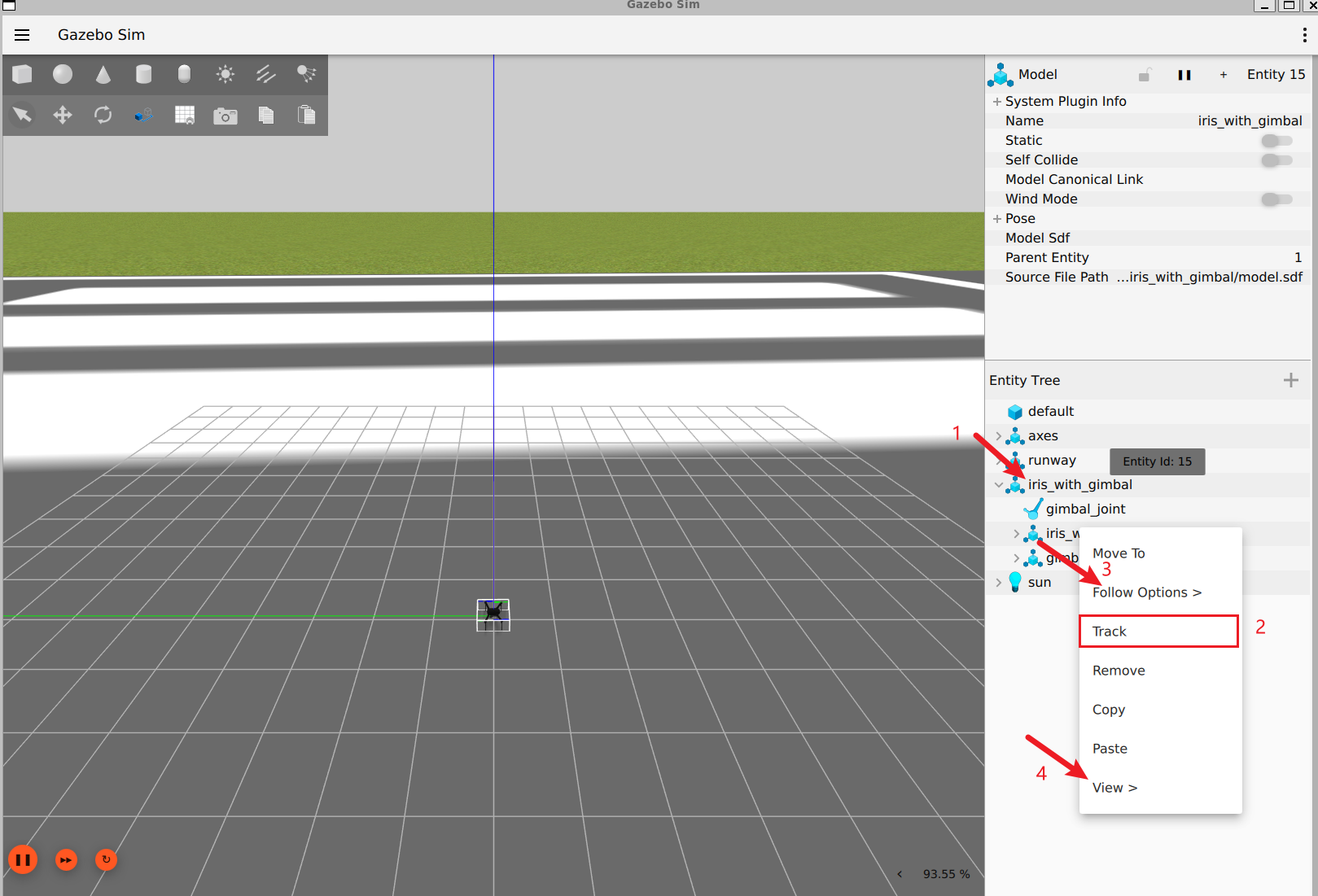
- 设置跟随的固定偏移视角
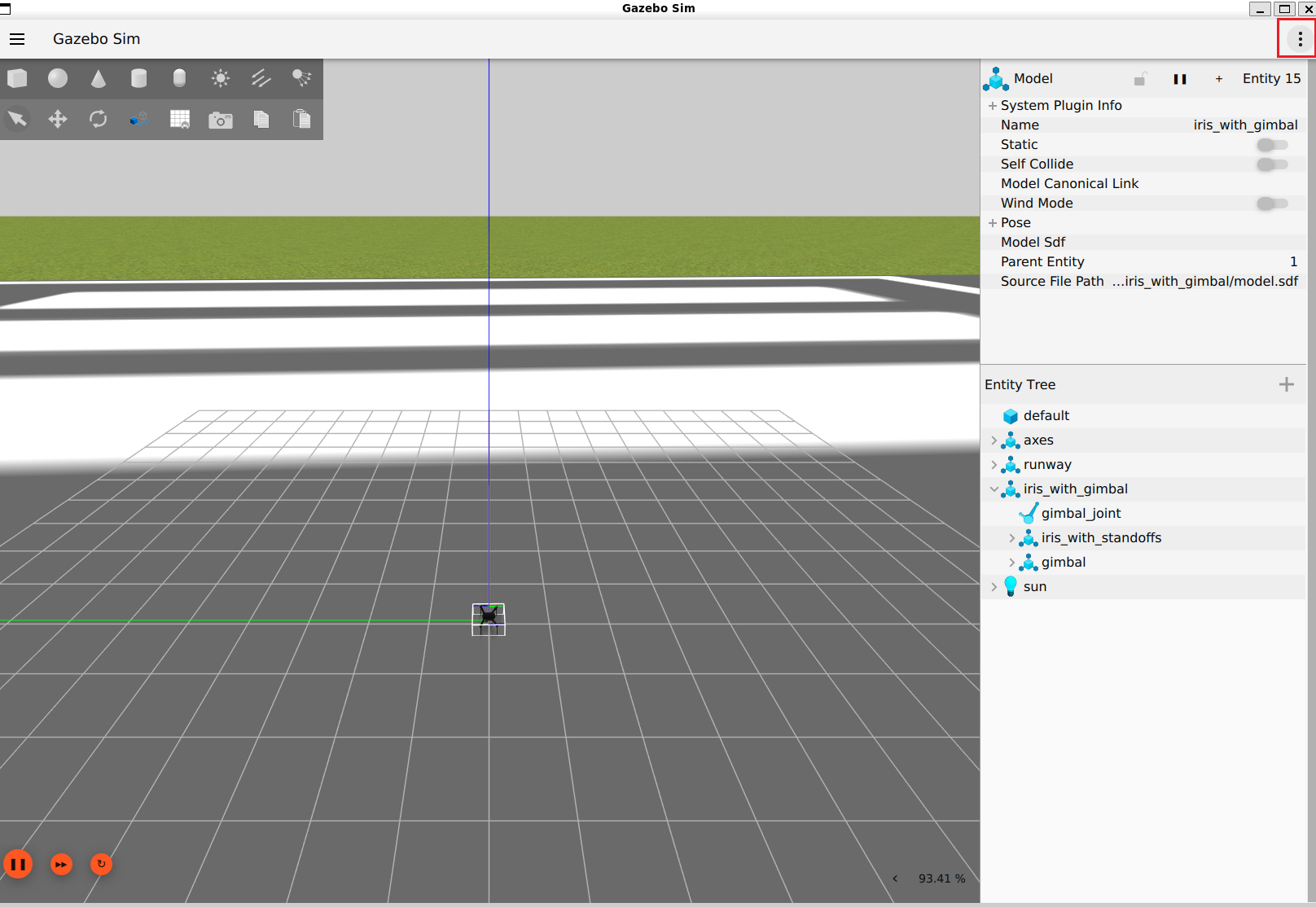
右上角的 $\vdots$, 点击后搜索 Camera Tracking Config,设置跟随视角的相关信息
点击Camera Tracking Config后,右下角会展示Camera Tracking Config的具体设置栏,设置 Track Offset 以及 Follow Offset
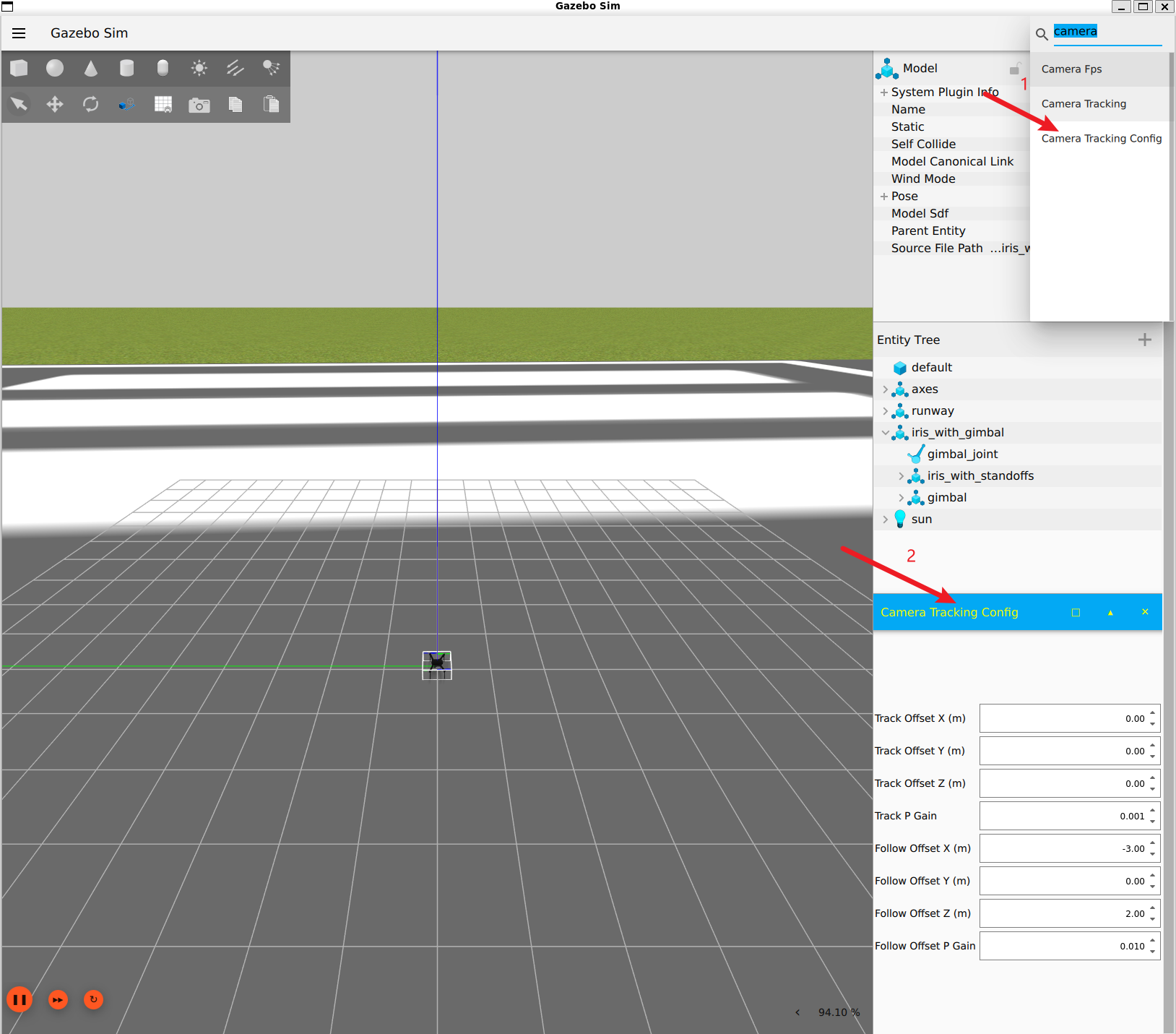
设置值为
Track Offset X=0.50
Track Offset Y=0.50
Track Offset Z=0.50
Track P Gain=0.030		   # 根据设置的偏移值,重新调整视角的快慢(可以稍微高一点)
Follow Offset X=-2.00
Follow Offset Y=-2.00
Follow Offset Z=1.00
Follow Offset P Gain=0.050  # 根据设置的偏移值,重新调整视角的快慢(可以稍微高一点)
- Gazebo Harmonic GUI界面操作解释, https://gazebosim.org/docs/latest/gui/
- 老版本的Gazebo操作界面解释, https://classic.gazebosim.org/tutorials?cat=guided_b&tut=guided_b2
遇到的问题
软件卡顿问题
WSL Ubuntu如果直接使用 ardupilot_gazebo 中写的sdf文件,软件运行时可能会很卡(CPU负载过高,接近100%)
ogre2没有安装
安装orge2.x(也称为Ogre Next)
sudo apt -y install wget lsb-release gnupg
sudo sh -c 'echo "deb http://packages.osrfoundation.org/gazebo/ubuntu-stable `lsb_release -cs` main" > /etc/apt/sources.list.d/gazebo-stable.list'
wget http://packages.osrfoundation.org/gazebo.key -O - | sudo apt-key add -
sudo apt update
sudo apt install libogre-next-dev
也看看ogre1.x有没有安装
# install ogre 1.9
sudo apt-get install libogre-1.9-dev
https://gazebosim.org/api/rendering/9/installation.html
更换渲染引擎
gz sim -v4 -r iris_runway.sdf --render-engine ogre
Gazebo渲染引擎
- OGRE (Object-Oriented Graphics Rendering Engine):Gazebo 最初采用的渲染引擎,提供了丰富的图形渲染功能。
- OGRE2 (也称为 Ogre Next):OGRE 的更新版本,带来了更高效的渲染性能和现代图形特性。
- OptiX(实验性渲染引擎):NVIDIA 提供的光线追踪引擎,适用于需要高质量渲染的应用。
Gazebo物理引擎
- ODE (Open Dynamics Engine):Gazebo Classic 的默认物理引擎,适用于一般的机器人仿真。
- Bullet:以其高性能和准确的碰撞检测而闻名,适用于需要精确物理模拟的应用。
- DART (Dynamic Animation and Robotics Toolkit):提供先进的动力学模拟功能,适合复杂的机器人系统。
- Simbody:专为生物力学和人体建模设计,适用于需要高精度动力学模拟的场景。
改为gpu渲染
- 终端变量设置
export LIBGL_ALWAYS_SOFTWARE=0
该变量影响 OpenGL 库在程序运行时的行为,
LIBGL_ALWAYS_SOFTWARE=1时强制 OpenGL 使用软件渲染而不是硬件加速渲染LIBGL_ALWAYS_SOFTWARE=0时允许 OpenGL 库尝试使用可用的硬件加速(不一定会找到可使用的硬件加速)
因此需要系统有正确的显卡驱动程序,如nvidia的cuda
WSL2 安装cuda,配合OpenGL 库寻找可用的硬件加速
powershell 检查WSL2内核版本是否满足要求, https://learn.microsoft.com/zh-cn/windows/ai/directml/gpu-cuda-in-wsl
wsl cat /proc/version # 需要5.10.43.3 或更高版本的内核版本
进入nvidia命令帮助界面, https://developer.nvidia.com/cuda-downloads?target_os=Linux&target_arch=x86_64&Distribution=WSL-Ubuntu&target_version=2.0&target_type=deb_local
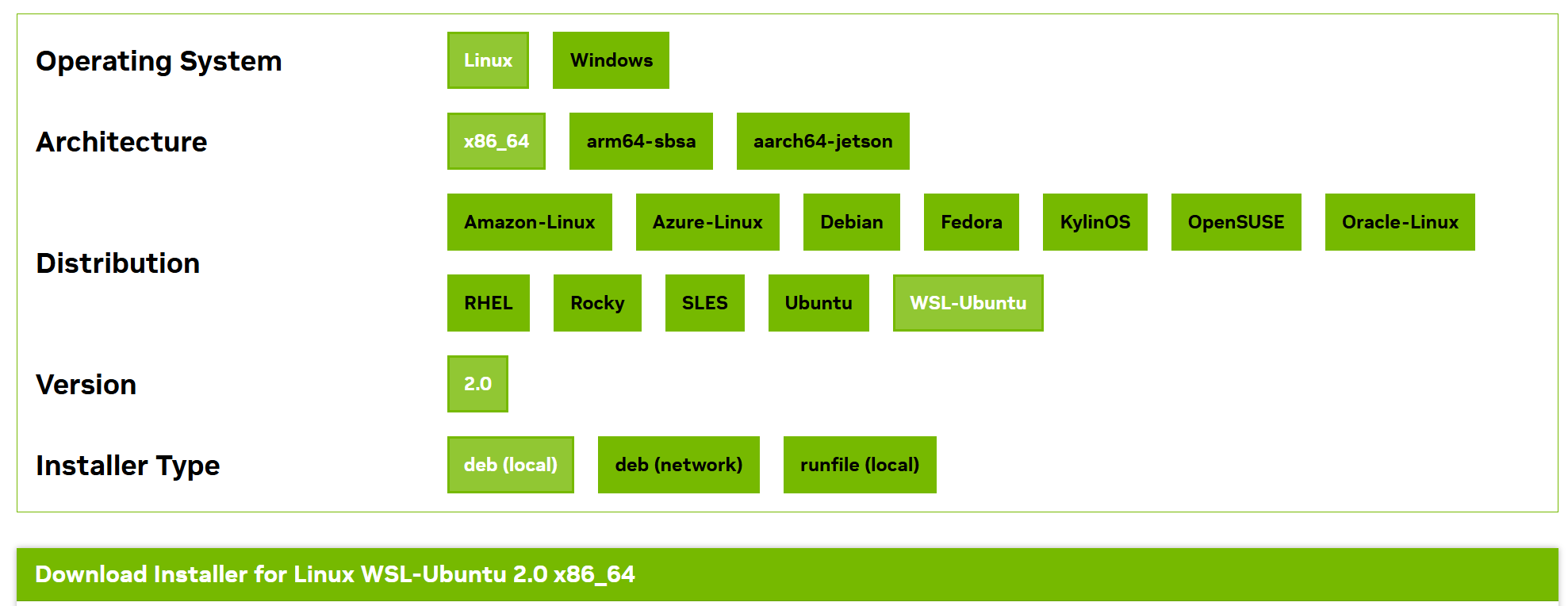
Linux WSL-Ubuntu 2.0 x86_64 安装命令
wget https://developer.download.nvidia.com/compute/cuda/repos/wsl-ubuntu/x86_64/cuda-wsl-ubuntu.pin
sudo mv cuda-wsl-ubuntu.pin /etc/apt/preferences.d/cuda-repository-pin-600
wget https://developer.download.nvidia.com/compute/cuda/12.8.1/local_installers/cuda-repo-wsl-ubuntu-12-8-local_12.8.1-1_amd64.deb
sudo dpkg -i cuda-repo-wsl-ubuntu-12-8-local_12.8.1-1_amd64.deb
sudo cp /var/cuda-repo-wsl-ubuntu-12-8-local/cuda-*-keyring.gpg /usr/share/keyrings/
sudo apt-get update
sudo apt-get -y install cuda-toolkit-12-8
安装完成后检验是否安装成功驱动
$ nvidia-smi
Fri Apr 25 10:46:48 2025
+-----------------------------------------------------------------------------------------+
| NVIDIA-SMI 565.75                 Driver Version: 566.24         CUDA Version: 12.7     |
|-----------------------------------------+------------------------+----------------------+
| GPU  Name                 Persistence-M | Bus-Id          Disp.A | Volatile Uncorr. ECC |
| Fan  Temp   Perf          Pwr:Usage/Cap |           Memory-Usage | GPU-Util  Compute M. |
|                                         |                        |               MIG M. |
|=========================================+========================+======================|
|   0  NVIDIA GeForce RTX 4060 ...    On  |   00000000:01:00.0  On |                  N/A |
| N/A   44C    P8              2W /   80W |     442MiB /   8188MiB |      3%      Default |
|                                         |                        |                  N/A |
+-----------------------------------------+------------------------+----------------------+

+-----------------------------------------------------------------------------------------+
| Processes:                                                                              |
|  GPU   GI   CI        PID   Type   Process name                              GPU Memory |
|        ID   ID                                                               Usage      |
|=========================================================================================|
|  No running processes found                                                             |
+-----------------------------------------------------------------------------------------+
设置终端变量
export __NV_PRIME_RENDER_OFFLOAD=1
export __GLX_VENDOR_LIBRARY_NAME=nvidia
export __VK_LAYER_NV_optimus=NVIDIA_only
具体设置流程以及命令解释查看 https://sdl.moe/post/linux-nvidia-prime/
查看目前的OpenGL 渲染引擎是否已成功更换
glxinfo | grep "OpenGL renderer"
细节展示问题
gazebo_ardupilot项目中的模型设置下,UAV飞行过程中并没有很好地展示UAV的姿态细节,比如攻击情况下可能存在的姿态细节抖动
因此修改sdf文件,模型以及世界设置
- 修改传感器更新频率
打开要运行的sdf文件,在sdf文件中搜索 update_rate,修改该标签对应的值,相对较大即可
- 提高仿真精度
<max_step_size>0.001</max_step_size>
<real_time_factor>1.0</real_time_factor>
max_step_size 越小,物理计算越精确
可以新增标签 real_time_update_rate ,该标签越高,每秒仿真更新越多
real_time_factor代表和真实时间的比率,为1即代表和真实时间流速一致,这里没有必要更改
$Reference$
gazebo官方 https://gazebosim.org/about
https://zhuanlan.zhihu.com/p/590825660
https://zhuanlan.zhihu.com/p/663567251
https://blog.csdn.net/lida2003/article/details/137870386
https://ardupilot.org/dev/docs/sitl-with-gazebo.html